Dragon Drive
Exploring how gaze could give context to voice commands in a future autonomous vehicle—and make a multimodal system’s response visible.
Exploring gaze as a new input modality
Dragon Drive was a future-facing technology demonstrator, not a production interface for someone actively driving. Its UI sat prominently in the center of the windshield—effective for showing the technology, but not a claim that this was the right attention model for today’s cars.
The concept looked ahead to autonomous vehicles, where occupants could interact differently once they no longer needed to watch the road continuously. Gaze gave the system context: someone could look at the phone widget, say “call someone,” and the car could understand which domain the command referred to. Motion then confirmed what the system had recognized and how it was responding.
Dragon Drive brought voice, gaze, a projected HUD, and an embedded center display into one real-time experience. I led the UI and interaction design for the windshield HUD and worked as the technical designer translating prototypes and animation intent into behavior the display systems could carry.
- Scenario
- A future autonomous vehicle with new ways for occupants to interact.
- Purpose
- Demonstrate multimodal technology, not a production-ready driving interface.
- System
- Windshield HUD, gaze input, voice, and embedded display.
- Design job
- Use gaze to establish context and make the system’s interpretation visible.
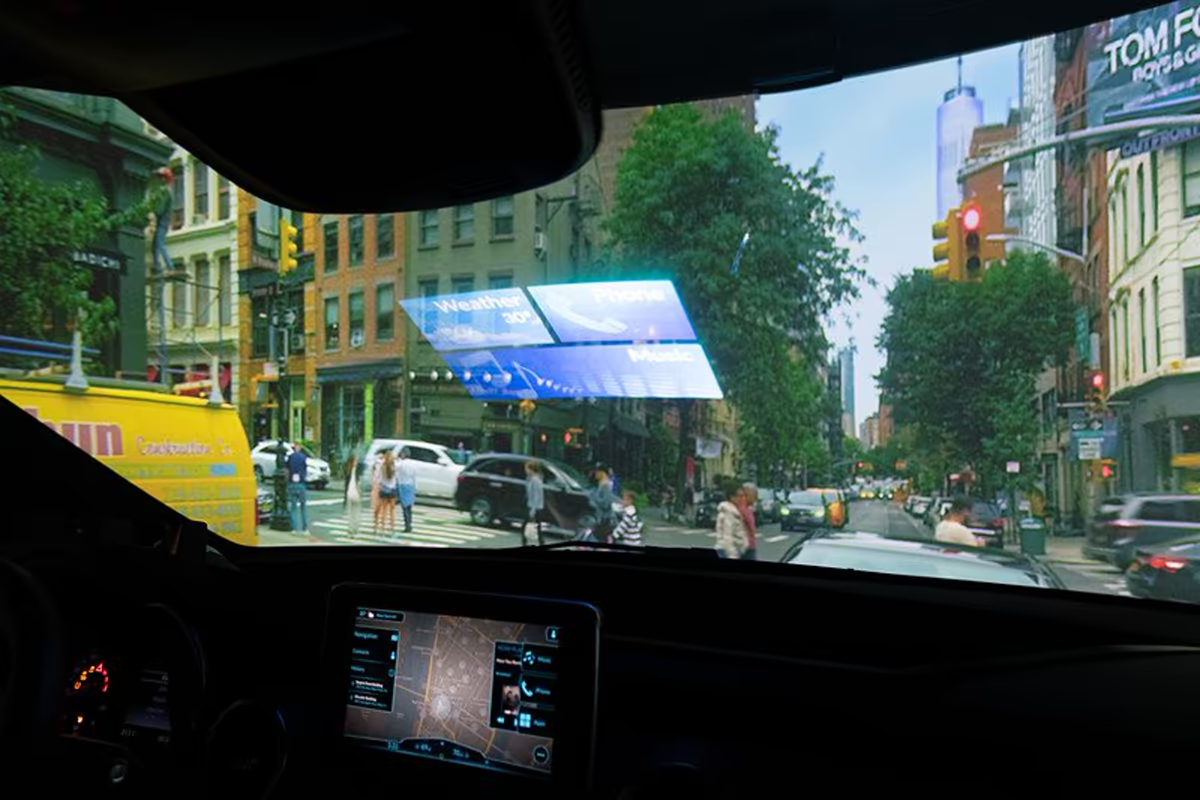
Gaze established context. Voice completed the command.
The HUD explored a simple multimodal pattern: look at a widget to establish the relevant domain, then speak naturally. Focus and motion showed which context was active and made the system’s interpretation visible before it responded.
Choose context
Look at a stable widget—phone, music, weather, or navigation—to indicate the relevant domain.
Confirm focus
Use motion to acknowledge which widget has gaze focus and what the system is ready to act on.
Speak naturally
Interpret the voice command within that context, then show the response across the HUD and embedded display.
The prominent windshield UI made the underlying interaction easy to see in a CES demo. It was built to explore gaze, voice, and display coordination for a future autonomous-vehicle experience—not to propose a production interface for use while a person was actively driving.
I translated design intent into embedded behavior
As the technical designer, I worked between interaction design and implementation. I used prototypes and animation studies to make the intended behavior concrete, then translated that behavior for the embedded display and HUD teams.
The work was not simply making transitions look polished. Timing, hierarchy, movement, and feedback each carried meaning. The handoff had to preserve that meaning as the experience moved from a design prototype into a constrained, real-time automotive system.
-
Make the moment tangible
Model gaze, focus, selection, and feedback as a complete interaction rather than a sequence of static screens.
-
Name the states and transitions
Break the prototype into triggers, state changes, timing, layering, and visual assets that could be discussed precisely.
-
Adapt motion to the display system
Shape the behavior for the embedded pipeline and HUD while protecting the interaction’s hierarchy and intent.
-
Evaluate it in physical context
Review projection, gaze behavior, system timing, and feedback as part of the full in-car demonstration.
A multimodal technology demo in a simulated drive
The HUD was featured at the Dragon Drive Innovation Showcase at CES 2019. The vehicle remained stationary while a surrounding screen simulated movement. Within that staged environment, gaze, animated feedback, voice, and the embedded display could be demonstrated as one system.
The demonstration showed how gaze, voice, motion, and two displays could behave as one multimodal system.
The HUD itself remained a demonstration. Separately, Nuance’s Dragon Drive platform became the core technology behind the conversational features in Mercedes-Benz’s MBUX. Mercedes-Benz created its own branded interface, so the production system was not a deployment of this UI.
My contribution was UI and interaction-design leadership plus technical translation for the HUD and embedded experience. The underlying gaze technology, vehicle platform, and wider Dragon Drive engineering were collaborative system inputs—not my individual inventions.